LandingPage in Mewayz
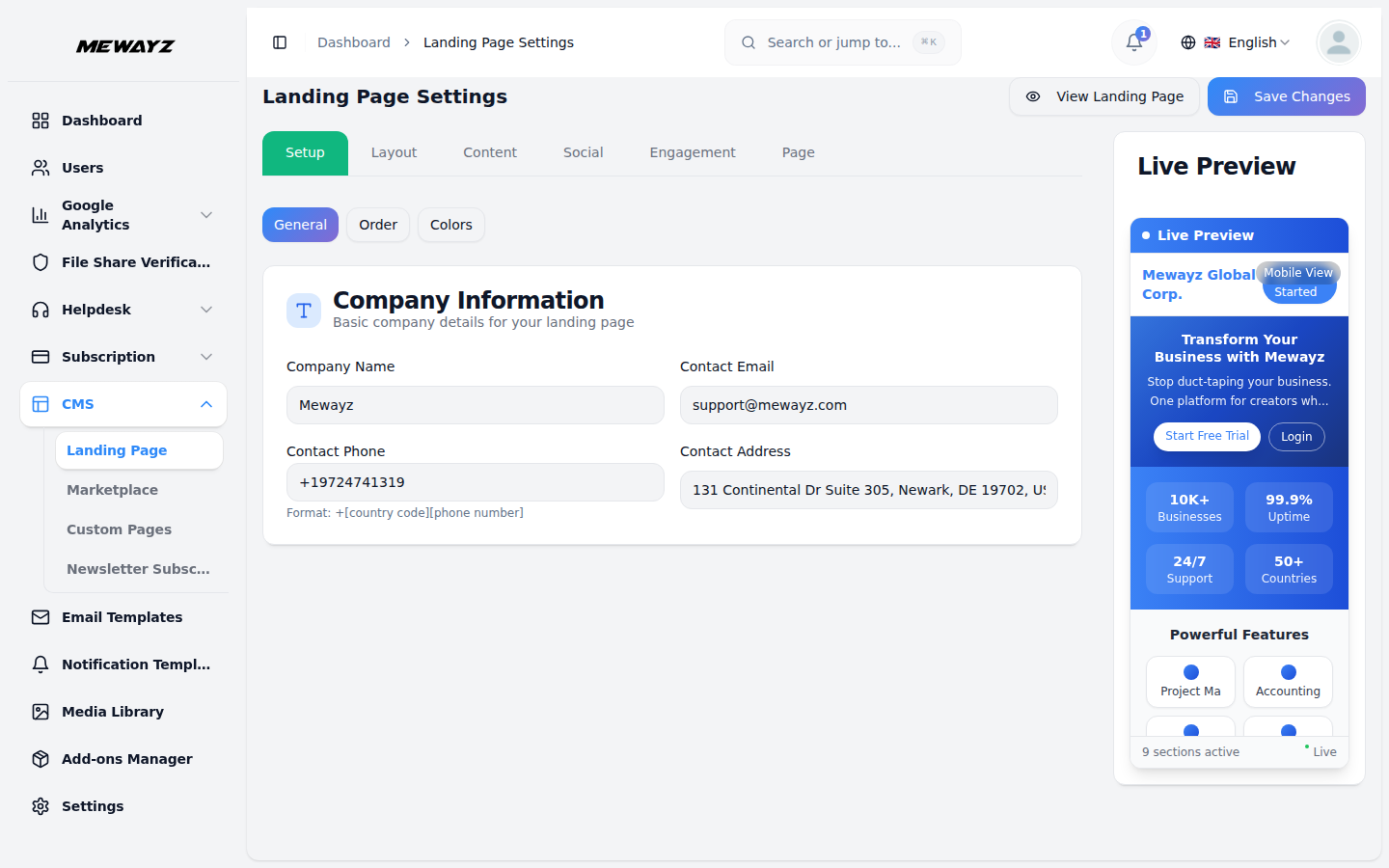
The LandingPage Add-On serves Mewayz's public marketing surface and gives operators a CMS-driven editor for hero, pricing, custom pages, and the module marketplace.
Mewayz-original module — no Mewayz upstream. Documentation authored from package source at
packages/mewayz/LandingPage/.
Introduction
The LandingPage Add-On is the package that renders the **public, unauthenticated** marketing surface of every Mewayz tenant. The home page at /, the pricing page at /pricing, the Add-Ons catalog at /addons, the per-module marketplace page at /marketplace/{slug}, the security page, the contact-sales page, the white-label reseller page, the custom CMS pages — all of them are rendered by this package.
It serves two parallel purposes:
- Default front door for Mewayz —
app.mewayz.com/, - Tenant marketing builder — White-label resellers and any
india.mewayz.com/, southasia.mewayz.com/, and the future WL resellers all use it.
tenant with the right permissions can fully re-skin and re-copy the page via a CMS-style editor under Admin → LandingPage Settings.
How to enable this module
LandingPage is always-on — it ships with every Mewayz install because every tenant needs a front door. There is no Add-Ons toggle for it. The sidebar entry for the editor only appears for operators with the manage-landing-page permission.
Public Pages
| Path | Purpose |
|---|---|
/ | Hero, features, stats, testimonials, CTA — the operator's marketing landing |
/pricing | All active plans from the plans table, with monthly/yearly toggle. FAQ schema rendered as JSON-LD for rich Google previews |
/addons | Browsable catalog of all add-ons with filters by search, category, and price; renders an ItemList JSON-LD |
/marketplace/{slug} | Per-module detail page — module description, screenshots, related modules; dynamic og:image |
/security | Trust page with FAQPage JSON-LD (compliance, encryption, data handling) |
/contact-sales | Sales contact form for enterprise inquiries |
/white-label | White-label reseller info + pricing |
/page/{slug} | Custom CMS pages (privacy policy, ToS, custom marketing pages) |
/sitemap.xml, /sitemap-{type}.xml | Dynamic XML sitemaps |
/explore, /tools, /templates | Content discovery pages |
POST /newsletter/subscribe | Newsletter signup (no auth) |
LandingPage Editor
- Navigate to Admin → LandingPage Settings.
- The editor exposes the entire page as a series of sections:
- Hero (heading, subheading, CTA buttons, background image)
- Features (list of feature cards with icons)
- Stats (numbers + labels — live user count is auto-injected)
- Gallery (image grid)
- CTA (mid-page conversion section)
- Testimonials (rotating quotes)
- Footer (links, social icons, contact info)
- Each section has its own JSON config block in
config_sections. - All settings are cached in Redis for 3,600 seconds — after a save,
Toggle visibility, reorder, edit copy, swap images.
the cache is flushed automatically.
Required Save Steps
- Make changes in the editor.
- Click Save Changes.
- The settings row is updated, Redis cache is flushed, the public
page reflects the change on the next request.
Marketplace Settings
Each module surfaced via /marketplace/{slug} is configured under Admin → Marketplace Settings → {module}.
Per-module fields:
- Hero image — Banner shown at the top of the module page
- Screenshots — Gallery of screenshots
- Description — Long-form description (Markdown-supported)
- Features list — Bullet points
- Pricing tier — Which plan tier includes this module
- Visibility toggle — Show/hide from the marketplace listing
Custom Pages
- Navigate to Admin → Custom Pages.
- Click + New Page.
- Fields: Slug, Title, Meta description, Content
- The page is then live at
/page/{slug}with full SEO meta - Standard CRUD applies — pages can be edited and deleted.
(rich editor).
rendered.
Newsletter Subscribers
- Navigate to Admin → Newsletter Subscribers.
- The list view shows every email captured via the
- Export — Download the full list as CSV.
- Delete — Remove rows individually.
/newsletter/subscribe public endpoint, plus the page they subscribed from (lead tracking).
Database Tables
The package adds four tables:
landing_page_settings— One row per tenant; JSON sections forcustom_pages— User-created CMS pagesmarketplace_settings— Per-module marketplace customizationnewsletter_subscribers— Email + lead-tracking fields
hero, features, stats, gallery, CTA, etc.
What Tenants Can Customize vs. What's Hardcoded
Customizable (via the editor):
- All visible section copy and images
- Section order and visibility
- Brand company contact info (used in footer + meta)
- Per-module marketplace pages
Hardcoded (lives in package source):
- Meta description templates (until you override per-page)
- Breadcrumb structure
- JSON-LD schema templates (Question/Answer for FAQ pages)
- Route structure (cannot rename
/pricingor/addons) - Cache TTL of 3,600 seconds
Permissions (Spatie)
manage-landing-page,view-landing-page,edit-landing-pagemanage-marketplace-settingsmanage-custom-pages,create-custom-pages,edit-custom-pages,manage-newsletter-subscribers,view-newsletter-subscribers,
delete-custom-pages
export-newsletter-subscribers
Assign via Settings → Roles & Permissions.
Operator Notes
- The live user count on the home page stats section is
- Uploaded images are normalized to a single filename in the DB;
- Cloudflare cache: Mewayz's production zones cache the public
- For white-label resellers: Landing-page customizations are
cached and auto-updates. Don't try to override it manually.
the public URL is computed at render time from the storage symlink.
pages aggressively. After publishing a copy change, either wait for the normal TTL to expire or trigger a CF cache purge to see it live faster.
scoped to the WL tenant by created_by — each reseller has their own row in landing_page_settings. WL brand colors flow through automatically.