Newsletter Integration in Mewayz
Newsletters are like your personal email assistant, making it a breeze to reach out to customers, vendors, and employees.
Introduction
Newsletters are like your personal email assistant, making it a breeze to reach out to customers, vendors, and employees. Instead of crafting each email one by one, you set the rules and content templates, and the system takes care of the rest. This automation not only saves you loads of time but also minimizes the effort required to manage your communications effectively. By using filters, you can precisely target the recipients who meet specific criteria, ensuring your message is delivered to the right audience. This streamlined approach to communication offers immense convenience and efficiency.
How to enable this module
To Set Up the Newsletters Add-On, you can follow this link: Setup Add-On.
How To Use The Newsletter Add-On?
- Once you purchase and install the Newsletter Add-On, go to
- Once you click on the Newsletter option, you will be taken
- These two sections are all you need to create, send, and
the sidebar and search for the Newsletter Add-On. You will get to see many pages over there.
to a screen where you will see two main pages: Send Mail and History.
track newsletters across various modules and sub-modules.
Send Mail
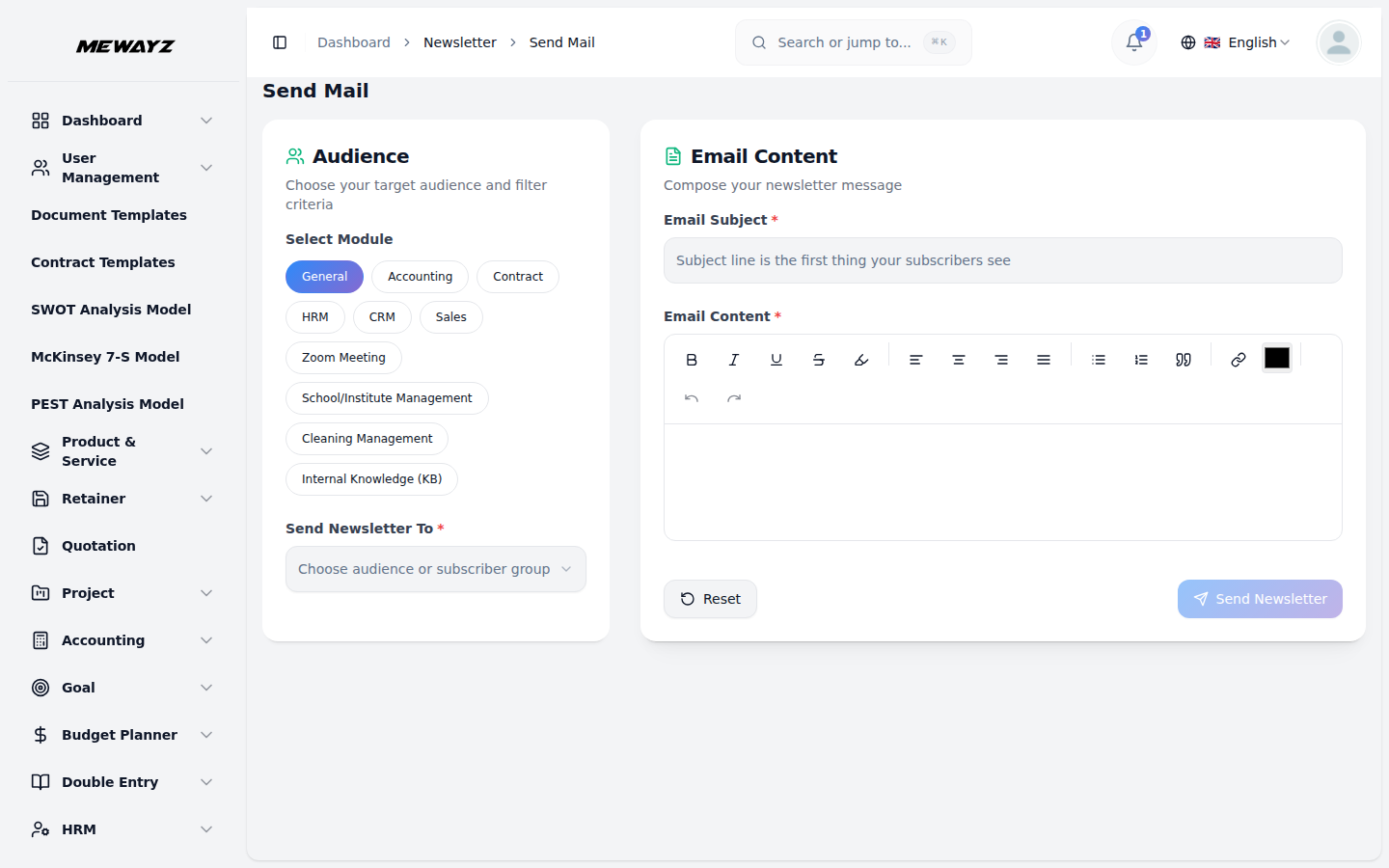
- On the Send Mail page, you will be able to
- First, select the
- Next, enter the email subject in the
- After filling in the necessary details, you can
- Please note that your newsletter
- This makes it easier to share information, updates, or
send new newsletters to users associated with different modules and sub-modules available in your system.
module and sub-module for which you want to send the newsletter.
designated field and then write the email content or message that you want to deliver.
send the newsletter directly from this page without needing to move to any other section.
**will only be sent successfully if all required email credentials are already entered correctly under the Email Settings section** of the system, so make sure this configuration is completed in advance to avoid failed deliveries.
announcements with the relevant users in just a few clicks.
History
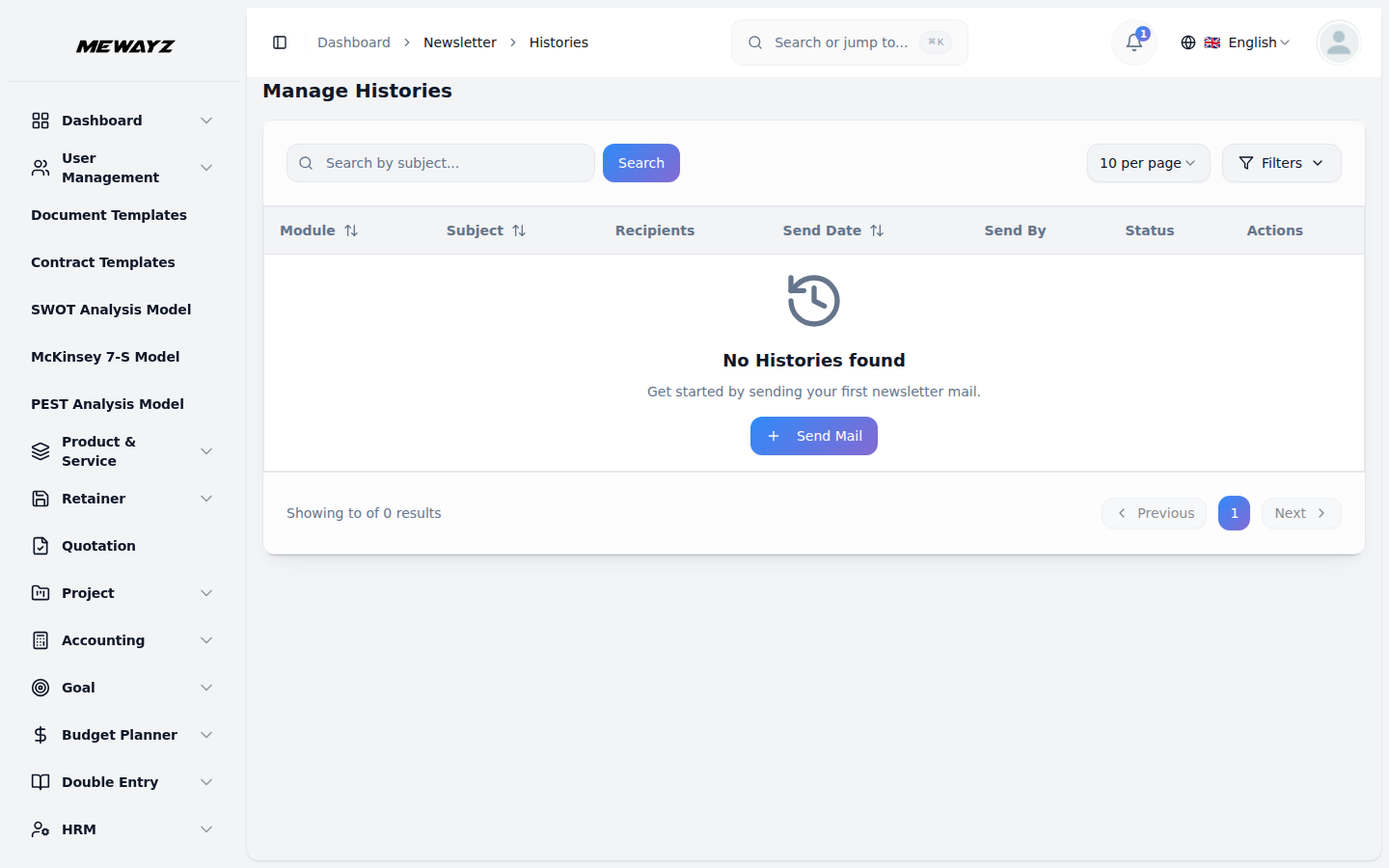
- Click on the History tab to see a list
- On this page, you will find the
- If any newsletter failed to send, you will be able to
- This section helps you keep a
of all newsletters that have already been sent from the system.
complete history of newsletters, along with their delivery status, so you can check whether each message was successfully delivered or not.
see that here, allowing you to take action if necessary.
record of all past communications, making it easier to track what was sent and when.
Note: Here is a list of some Add-Ons that we can easily connect to with the Newsletter Add-On.
General
- Sales Invoice
- Proposal
- Purchase
Accounting
- Customer
- Vendor
Assets
- Assets
Contract
- Contract
HRM
- Employee
- Leave
- Award
- Transfer
- Resignation
- Promotion
- Termination
CRM
- Lead
- Deal
Recruitment
- Interview Schedule
- Job Application
Retainer
- Retainer
Sales
- Account
- Contact
- Sales Order
- Meeting
- Call
Zoom Meeting
- Zoom Meeting
Commission
- Commission plan
School-Institute Management
- Student
- Admission
Fleet
- Driver
- Vehicle
- Vehicle Booking
Car Dealership
- Car purchase
- Car sale
Childcare Management
- Inquiries
Tour & Travel Management
- Tourist Inquiry
- Tourist Booking
Parking Management
- Parking
Beauty Spa Management
- Booking
Waste Management
- Collection Requests
Cleaning Management
- Cleaning Team
Sales Agent
- Sales Agents
Pharmacy Management
- Pharmacy Bill
- Pharmacy Invoice
Newspaper Distribution Management
- Agent
Garage-Workshop Management
- Service
Internal Knowledge
- Book
Property Management
- Tenant